Operations & administration
OPSYOperations & Administration- Prepare records, invoices and job sheets
- Reduce repeated entry and slow hand-offs
- Flag missing details before work moves on
AUTOBOTSZ · AI Automation Workforce
AUTOBOTSZ is an Artificial Intelligence Automation Workforce: a governed operating layer around the systems and people you already trust. It is designed to handle permitted routine work, bring exceptions to the right person and check what completed — while you keep control of important decisions.
One coordinated operating layer. Not another chat tool.
Request.
Make room for the work that matters
Create capacity without automatically growing headcount. Assess value through completed work, handling time, exceptions and avoidable cost — not promised returns.
What it actually does
AUTOBOTSZ provides business automation around your existing tools: watch for new work, coordinate permitted steps and check what happened. It is not another chat tool or a replacement for your stack.
AUTOBOTSZ is a UK business automation company with Greater Manchester roots, supporting suitable businesses nationwide through remote onboarding. Our artificial intelligence automation helps coordinate suitable routine work; AI onboarding checks your systems and agreed boundaries first. Optional AI receptionist services support business phone enquiries, subject to compatibility, permissions and testing, with human oversight.
An authorised request starts the work. The right capabilities prepare or carry out permitted steps; anything outside the agreed boundary waits or escalates. Recorded outcomes show what completed and what still needs attention.
Explore business automation workflowsHow it works
AI onboarding introduces artificial intelligence into suitable workflows: Automation Assessment, Systems Compatibility, Shadow Business Run, then Live Onboarding. Nothing is automated without your agreed rules and authorisation.
Describe the work, the outcome you want and the systems you use. We identify where automation can help.
Check connections, permissions and remote suitability. Setups needing onsite engineering are declined here.
Rehearse workflows, approvals, notifications and failure paths with synthetic/mock data, then review and resolve gaps.
Start read-only where possible. Activate live writes only after the required checks and approvals.
Shadow Business Run
Your proposed setup is validated before live onboarding.
AUTOBOTSZ creates a controlled, non-production representation of your systems, workflows, permissions and approval routes, using synthetic/mock data or other permitted test data — not a copy of your live data. We rehearse the proposed automation to find compatibility issues and likely snags before connecting live systems — read-only first where possible, then progressive activation with the required checks and approvals.
Automation Assessment → Systems Compatibility → Shadow Business Run → Live Onboarding.
Designed to minimise disruption by validating the setup before live onboarding; it cannot predict every live condition. If a mismatch appears, progression pauses before live writes. Incompatible environments are not forced through. Systems requiring specialist onsite technical implementation are declined at qualification.
Understand your systems
Shadow-run your workflows
Go live when ready
Where it helps
Start with the function that needs capacity. These examples show work to assess — availability depends on compatibility, permissions and testing.
Examples only. Availability depends on the systems involved, agreed permissions, assessment and testing.
Explore the optional AI receptionist and phone answering moduleOptional AI receptionist · UUKO by AUTOBOTSZ
Your conversational front door for AI phone answering, enquiry capture and supported languages — with governed workflows behind it. Phone service is not yet activated; connections and scope must be checked first.
Meet UUKO, your AI receptionistWhy AUTOBOTSZ is different
The fit comes first. The setup is tested before live work. Then your rules and recorded outcomes guide what happens next.
We tell you early if we’re not a fit.
We check your systems, available connectors and remote suitability before significant onboarding effort. If specialist onsite engineering is needed, we respectfully decline rather than force the setup.
We test your setup before we touch live operations.
Every AUTOBOTSZ setup is shadow-run before live activation. For standard packages, this is included in onboarding. For complex or bespoke deployments, an extended Shadow Business Run may be separately scoped and priced.
Designed to minimise disruption, using a representative test setup — not a copy of your live data. It cannot predict every live condition.
Defined specialists. One coordinated workforce.
Each capability has a name and a clear role. Start with the specialists your workflow needs, working within authorised scope — not a collection of anonymous modules.
Your rules determine autonomy.
Your rules decide what runs, what waits for approval, what is blocked, and what gets escalated. Identity verification never silently grants approval authority.
Recorded work, not assumed results.
See what is working, why it was routed there, what it can access, and what outcome it produced — where your permitted records support it. Missing evidence stays unavailable; savings are not invented.
Ask anything. You don’t need to learn every capability.
UUKO — Your AUTOBOTSZ a.i. service assistant — is your human-friendly front door to permitted work, approvals and recorded updates. It does not widen authority, grant permissions or approve for you.
UUKOYour AUTOBOTSZ a.i. service assistantOne account. The same boundaries.
Web and mobile are designed around the same account, workflows, permissions, approvals and recorded context. Mobile release and notifications depend on availability and enablement.
Simple when simple. Deeper assurance when complex. We keep standard onboarding proportionate: compatibility checking and a Shadow Business Run for everyone, with an extended, separately scoped run where complexity warrants it.
Control & trust
Choose the level of control
Advisory — automation recommends, you decide. Assisted — routine work runs, important actions wait for approval. Autonomous — approved workflows run within agreed limits. The level can change as trust grows, and approved workflows can be paused — how that works for your setup is agreed during configuration.
The Automation Workforce
It is an Artificial Intelligence Automation Workforce designed to sit around the systems and people you already trust. Business functions come first. Use the specialists a workflow needs; you do not need to learn every name.
Defined roles, not a collection of chatbots.
Use the capabilities your workflows need — not every capability in every setup.
Illustrative coordination · not live activity
Coordinates AUTOBOTSZ capabilities around approved business rules, permissions, workflows and escalation conditions.
At rest · capabilities available
Communications
Supports customer enquiries and follow-ups through authorised channels, within your agreed rules.
Data Integrity & Operational Defence
Checks authorised access and record integrity. Flags security or data concerns for your review.
Operations & Administration
Prepares records and routine admin, one step at a time. Work beyond agreed limits waits for your approval.
Commercial Intelligence
Shows commercial opportunities with evidence. You review each suggestion before acting.
High-Volume Automation
Runs approved work in batches within agreed limits. Routes exceptions to the right person for review.
Automation Engineering & Innovation
Designs and tests workflow improvements. A person reviews changes before they reach live operations.
Business Intelligence & Executive Analysis
Turns available figures into clear reports. Shows missing data honestly, so decisions rest on evidence.
Governance, Assurance & Oversight
Checks actions against your rules. Routes important decisions to authorised people and records them.
Your AUTOBOTSZ a.i. service assistant
Ask about your available workflows, approvals and recorded updates. UUKO is your service layer, not the operational workforce, and does not grant permission or approve actions for you.
These are specialised capabilities coordinated through one AUTOBOTSZ platform — not separate products or independently deployed agents. Not every implementation uses every capability, and each operates within the rules and permissions you approve.
Business · Command Centre
One workforce. One set of permissions. Web and mobile.
See how work moves
Not just a view of the work. A clear thread from the first request to the recorded outcome, with human control where it matters.
UUKO · Service assistant
An operations manager asks UUKO to prepare an update about a delayed order. UUKO captures the request and passes the context on; it does not approve the reply.
Context captured
“Order EX-104 is delayed. Prepare an update for the customer, but let me review it first.”
Request linked to the example order
Coordinated by Autobots. Guided by UUKO. Consequential decisions stay with authorised people.
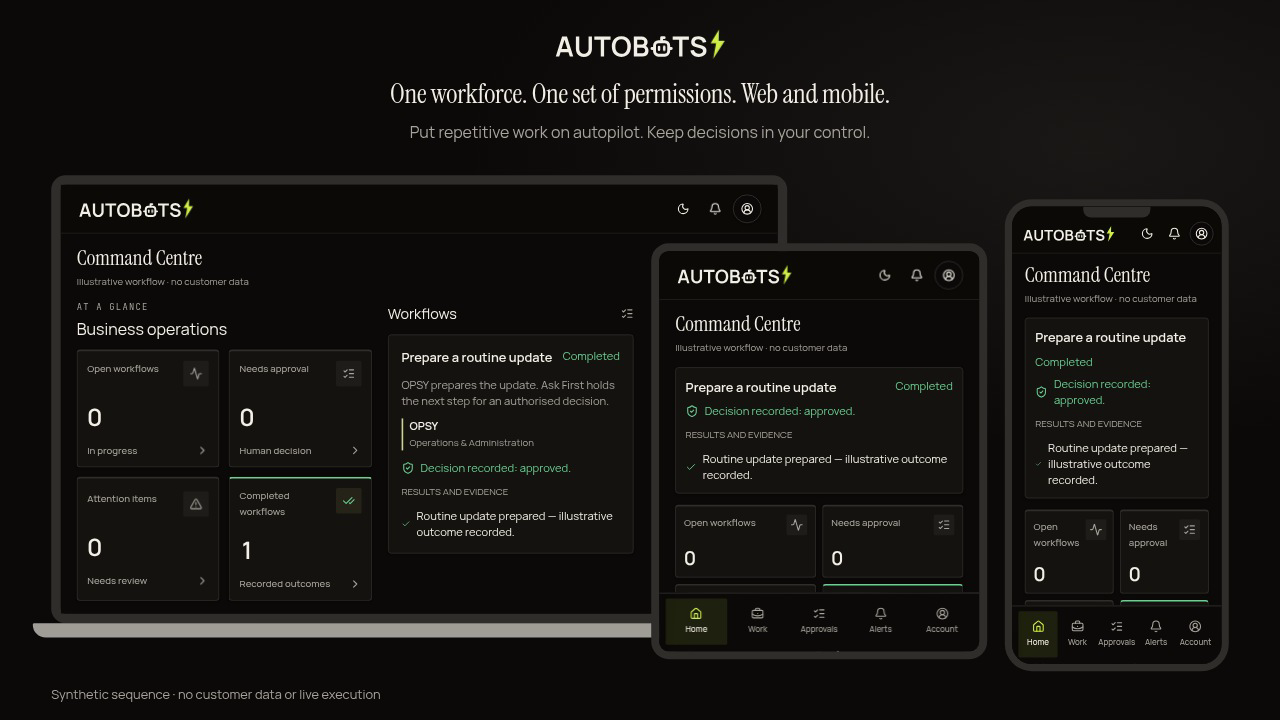
Use the Command Centre for depth. Use the app for approvals, alerts and control on the move.
How it worksOptional add-on
AURA — Marketing, Growth & Reputation Workforce — is designed to plan and draft marketing, growth and reputation work within your rules, including past-customer re-engagement, repeat-buying and upsell journeys, lead nurture and review response preparation. Connected-channel monitoring and execution depend on enabled integrations and separate authorisation; AURA never independently sends, publishes or spends.
AURA is an optional capability within the same AUTOBOTSZ platform, not a separate product or an already-active marketing service.
Plans and drafts checked against verified evidence. Publishing requires the applicable authorisation and execution controls.
Where connected, organise permitted feedback and identify what needs a response. Complaints go to a person; review requests must not filter for positive sentiment.
Prepare past-customer re-engagement, repeat-buying and upsell journeys, lead nurture and review responses from authorised information. Any connected automation follows your rules; outreach, publishing and spend remain separately authorised.
Evidence-linked opportunities from permitted sources. Research does not authorise outreach; sending remains separately gated.
See what the available figures support. Keep estimates separate from recorded results; do not claim growth where evidence is missing.
May Do / Ask First / Never Do / Escalate rules govern any enabled execution. AURA plans and drafts; authorised execution follows the applicable controls. Complaints and sensitive legal, privacy or payment matters escalate to a person.
Compatibility & onboarding
Start with the software and processes you already trust. AUTOBOTSZ checks available connections, security constraints and remote suitability before recommending a setup — not a replacement for your whole operation.
Remote-first. No routine onboarding call.
We reuse verified information where safe. Support is optional; systems needing specialist onsite technical implementation are declined early. Ecommerce is our initial focus; other sectors are assessed for suitable administrative work, not professional judgement.
Web + mobile control
Web, Android and iOS are designed around the same account, workflows, permissions, approvals and recorded context — not separate versions of your business.
A shared organisation profile and named responsible person provide context; permissions still belong to each signed-in user.
UUKO is your Ask anything service layer. AURA supports marketing, growth and reputation work where enabled; personalisation follows the verified account and authentication assurance.
Updates, approvals, exceptions and failures can reach you through notifications where enabled. Store availability and live push delivery are not claimed here.
A device biometric check confirms access to a credential, not whose face or fingerprint was used. Sensitive approvals still follow account permissions and the required checks.
Workforce Activity
For each agreed workflow, review completed work, timed runs where recorded, waiting approvals and exceptions. Compare like-for-like results with an agreed baseline where available; elapsed runtime alone is not time saved.
See recorded work and whether it completed, is waiting or needs attention.
Available records explain where work went. Missing details are not guessed.
See relevant access and limits. Automation cannot grant itself more authority.
Review completed work and exceptions. Savings and returns need supporting evidence.
Success means the agreed task completed within its boundaries, with exceptions visible and evidence to inspect. This is a measurement framework, not a customer case study or promised return. Visibility depends on recorded workflow evidence and your organisation's access. Approved operational context supports the work; capabilities cannot silently rewrite their own rules or policies.
Approved launch packages
A clear setup price and monthly service. Expand only where your systems, workflows and agreed permissions support it. All prices are ex VAT.
No standard package is presented as suitable for every business. Scope, connection requirements and terms come before commitment.
Common questions
Access, control, suitability and what happens next.
Automation Assessment
Tell us the work you want to reduce and the software you use. Start with three short steps; no routine call and no live access activated by submitting.
Please don't enter passwords, API keys, credentials, or patient, client or other sensitive personal information.
Choose your preferred level of human approval.
Optional human support or clarification: use the contact page or, where available, WhatsApp.